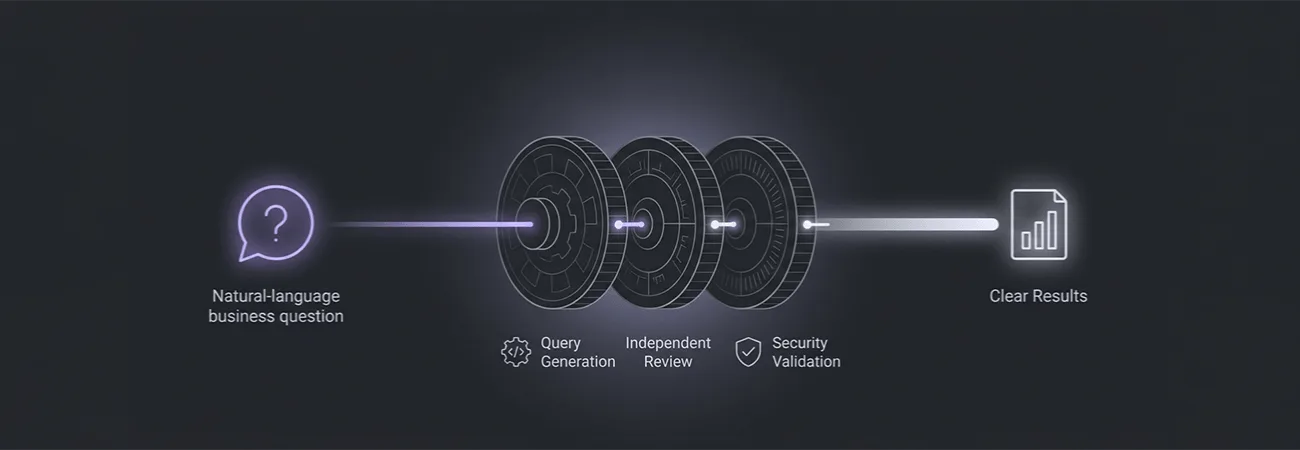
A secure AI reporting assistant should deliver accurate business insights without exposing production databases to unrestricted SQL generation. This post explores how approved views, constrained queries, independent validation, and proper auditing help organizations provide reliable, traceable answers while keeping sensitive data protected.
Business users want to ask questions of operational data in ordinary language. The shortest path from that request to a working demo is to let a model generate SQL and run it. That path also creates the largest ongoing risk. A generated query can read more rows than intended, join tables the user should not see, or return a number that looks precise because the query happened to execute.
We have built reporting assistants that generate SQL. The ones that remain in production do not let the model's query reach the database without an independent check, and they prefer to keep the model away from arbitrary SQL entirely when a semantic layer or a set of approved views can answer the question.
Approved views and a semantic layer come first
The safest design starts with the data the organization is willing to expose. Analysts and data owners define views or a semantic model that already encode the correct joins, the row-level filters, and the business definitions of metrics such as "active member" or "net revenue." The assistant is allowed to query only those objects. It cannot see the underlying tables.
When a user asks a question, the system maps the question to one or more of the approved objects and to the filters the semantic layer supports. The mapping can be done by a model, but the model chooses from a list the data team maintains. It does not invent table names or column names. If the question cannot be answered from the approved objects, the assistant says so and points the user to the person or the existing report that can help.
This approach limits the damage a bad mapping can do. An incorrect filter on an approved view still returns data the user is allowed to see. An incorrect query against base tables can return data the user is not allowed to see, or can create load that affects other systems.
When SQL generation is still used, it is constrained and reviewed
Some questions do not fit the current semantic layer and are common enough to justify a generated query. In those cases the model produces SQL against the approved views only. The generated statement is then checked by a second step that does not use the same model. The check confirms that the query references only allowed objects, that it includes the row-level security predicate the application expects, and that it does not contain statements that modify data.
The checked query runs with the permissions of a reporting account that can read the approved views and nothing else. Results are returned to the user only after the check passes. Queries that fail the check are logged and shown to the user as "this question could not be answered from the available data" rather than as a database error.
We also keep a record of the question, the generated query, the check result, and the final result set size. When a data owner later asks why a particular number appeared, the record shows the exact statement that ran and the view it used.
Result interpretation stays separate from query execution
After a query returns, a model can summarize the numbers or suggest a chart type. That summary is generated from the result set the query actually produced, not from the model's prior knowledge of what the numbers "usually" are. The summary includes the filters that were applied and the time range, so the user can see the boundaries of the answer.
We do not let the summary add caveats or comparisons that were not in the result. If the user asks whether the number is higher than last quarter and last quarter's figure was not retrieved, the assistant says the comparison data was not included rather than estimating it. The same rule applies to averages, totals, and rankings. They are computed from the returned rows or they are omitted.
Keeping the semantic layer current
An approved view that no longer matches the business definition is as dangerous as an unreviewed query. When the definition of an "active member" changes, the view and the description the assistant uses are updated in the same change. The evaluation set for the assistant includes questions that depend on the changed definition, so a regression is visible before the change reaches production.
Data owners review the list of approved objects on a schedule. Objects that are no longer used are removed so the assistant cannot choose them. New objects are added only after the same review that would apply to a new standard report. The assistant does not gain access to a table simply because the table exists in the database.
What users and auditors can both accept
Users get answers to the questions the approved data can support, with a clear statement when a question falls outside that set. Auditors can see which objects were queried, which filters were applied, and who approved the objects. The model is used to translate language into a choice among those objects and, when necessary, into a constrained query that a separate check must pass.
Letting the model write and run arbitrary SQL against production tables removes both of those properties. The constrained design takes more work to set up. It is also the design that lets the organization keep offering natural-language access after the first audit or the first incorrect number.